
The Hidden Cost of Copy-Pasting Code Into ChatGPT
<p>AI coding tools promise faster development. The <a href="https://metr.org/blog/2025-07-10-early-2025-ai-developer-study/" rel="noopener noreferrer">METR study</a> found the opposite: experienced developers were 19% slower on complex tasks when using AI, even though they perceived themselves as 20% faster. The biggest contributor wasn't bad code generation. It was the workflow around it.</p> <p>Every time you alt-tab from your editor to a chat window, paste a function, explain what it does, describe the bug you're seeing, read the response, mentally translate it back to your codebase, switch back to your editor, and apply the changes, you're paying a productivity tax that compounds across a day of work. <a href="https://www.microsoft.com/en-us/research/uploads/prod/2022/07/Disrupted_and_
AI coding tools promise faster development. The METR study found the opposite: experienced developers were 19% slower on complex tasks when using AI, even though they perceived themselves as 20% faster. The biggest contributor wasn't bad code generation. It was the workflow around it.
Every time you alt-tab from your editor to a chat window, paste a function, explain what it does, describe the bug you're seeing, read the response, mentally translate it back to your codebase, switch back to your editor, and apply the changes, you're paying a productivity tax that compounds across a day of work. Microsoft Research found that context switches during programming require an average of 10-15 minutes to regain deep focus. If you're switching to ChatGPT 20 times a day, the math is brutal.
What you lose in the copy-paste loop
When you paste a function into ChatGPT, the AI sees text. It doesn't see:
-
What file this function lives in
-
What other files import it
-
The test suite that covers it
-
The error log that prompted your question
-
The project structure or framework conventions
-
Whether the variable names match your codebase
You end up spending time explaining context that your editor already has. The AI hallucinates a response based on incomplete information. You debug the hallucination. The December 2025 CodeRabbit analysis found AI co-authored code contains 1.7x more major issues than human-written code, and much of that comes from missing context rather than model capability.
The spectrum of AI integration depth
Not all AI coding tools are equal. They fall on a spectrum from "zero context" to "full project awareness":
Integration level What AI sees Example tools
Chat window Only what you paste ChatGPT, Claude.ai
Editor autocomplete Current file + open tabs GitHub Copilot
IDE-native AI Full project, terminal, git Cursor, Windsurf
Domain-specific Project + runtime + engine state
Ziva (Godot), Copilot for Xcode
Each level down this table gives the AI more context, which means fewer hallucinations, less time spent explaining, and less debugging of AI output.
Why the METR study developers were slower
The METR study tested 16 experienced open-source developers on tasks from their own repositories. These developers knew their codebases intimately. When they used AI tools, they spent time on activities that felt productive but weren't:
-
Reviewing AI suggestions that didn't match their codebase conventions
-
Debugging AI-generated code that missed project-specific constraints
-
Re-prompting after bad outputs
-
Context-switching between their own mental model and the AI's suggestions
The study noted that less experienced developers showed higher productivity gains from AI tools. This makes sense: a junior developer working on an unfamiliar codebase has less context to lose. The AI's guess is as good as theirs. An expert's context is valuable, and the copy-paste workflow throws it away.
What the faster developers do differently
The developers who actually get speed gains from AI tools share common patterns:
They keep AI in the editor. Tools like GitHub Copilot, Cursor, and Windsurf run inside the IDE where the AI can see the full project. No alt-tab, no copy-paste, no explaining what file you're working on.
They use AI for generation, not consultation. Instead of asking "how do I implement X?" and reading a response, they describe what they want in a comment or prompt and let the AI generate code in place. The feedback loop is tighter because the output appears where it needs to go.
They pick tools that match their domain. A React developer using Cursor gets AI that understands JSX, component lifecycle, and the project's import structure. A game developer using something like Ziva in Godot gets AI that can read the scene tree, analyze debugger output, and see what's happening in the editor. The AI's context matches the developer's context.
They treat AI output as a first draft, not a solution. The METR study developers who were slowest were the ones who trusted AI output and spent time debugging it later. The faster developers used AI for initial scaffolding, then reviewed and adapted immediately.
Measuring your own context-switching cost
If you want to see how much the copy-paste workflow costs you, track it for a day. Count how many times you switch from your editor to a browser-based AI chat. Multiply by the number of minutes you spend there per visit (including the time re-reading the AI's response and figuring out how to apply it). For most developers, this number lands between 45 and 90 minutes per day.
Then try the same tasks with an in-editor tool for a week. Cursor's free tier is enough to test. If you're working in a specific domain like game development, check if a specialized tool exists (Copilot for Xcode, Ziva for Godot, etc.). The difference isn't subtle.
The context investment
Setting up AI tools that understand your project takes time upfront. Writing a good CLAUDE.md or .cursorrules file, configuring your MCP servers, or installing domain-specific plugins is an investment. But it's a one-time cost that pays off across every interaction.
The alternative, explaining your project from scratch every time you open a chat window, is an ongoing cost that never decreases. It's the difference between teaching someone your codebase once versus re-explaining it every conversation.
The METR study measured developers using AI tools as they existed in early 2025. The integration depth of AI tools has increased significantly since then. Chat windows are being replaced by in-editor assistants that see what you see. The productivity gap should narrow as context improves, but only for developers who stop treating AI as a separate tool and start treating it as part of their editor.
Sign in to highlight and annotate this article

Conversation starters
Daily AI Digest
Get the top 5 AI stories delivered to your inbox every morning.
More about
claudemodelopen-source
PhAIL ranks top robotics foundation models on real hardware
Positronic Robotics has launched PhAIL, a benchmark evaluating physical AI models on commercial tasks using throughput and reliability metrics. The post PhAIL ranks top robotics foundation models on real hardware appeared first on The Robot Report .
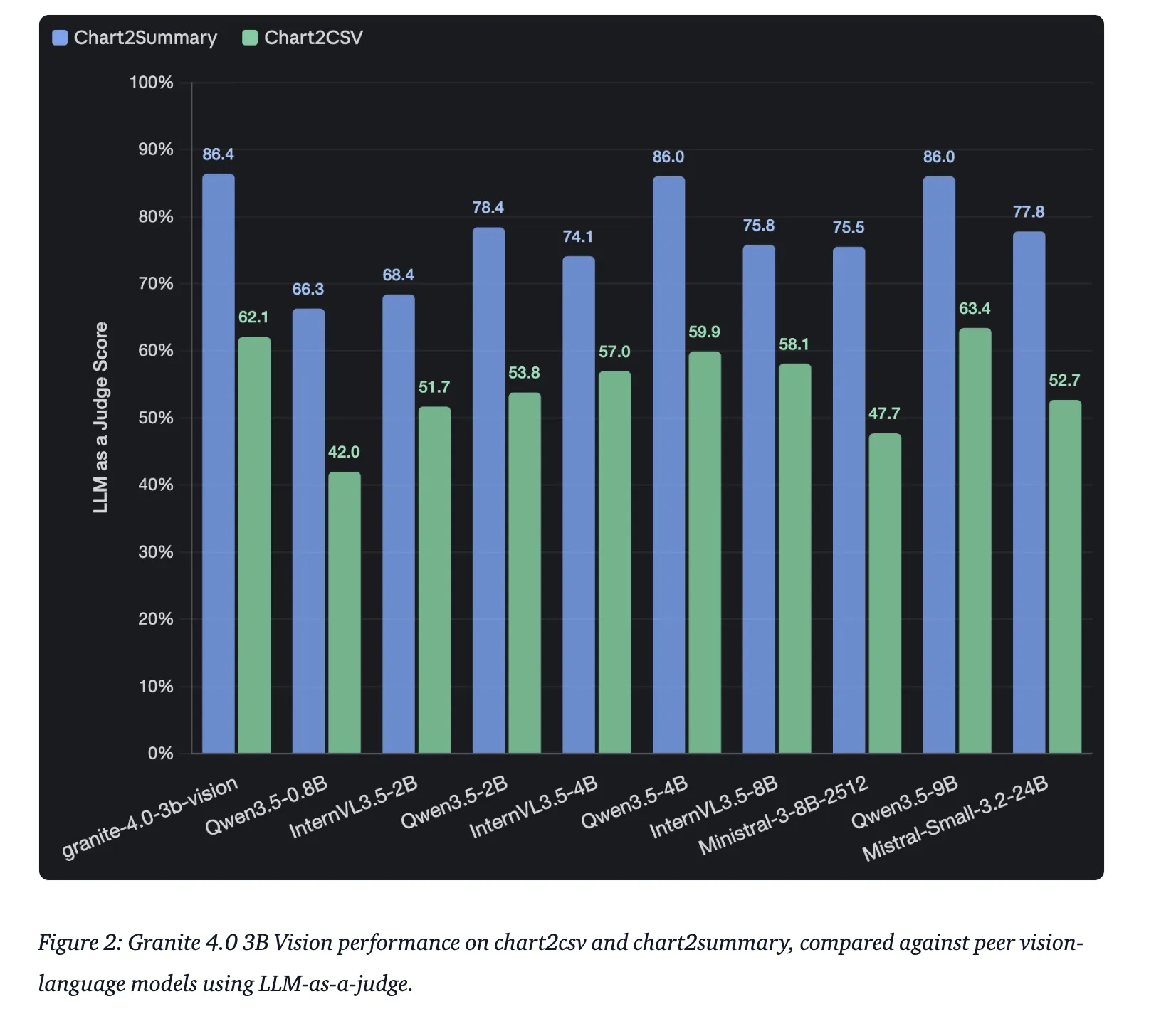
IBM Releases Granite 4.0 3B Vision: A New Vision Language Model for Enterprise Grade Document Data Extraction
IBM has announced the release of Granite 4.0 3B Vision, a vision-language model (VLM) engineered specifically for enterprise-grade document data extraction. Departing from the monolithic approach of larger multimodal models, the 4.0 Vision release is architected as a specialized adapter designed to bring high-fidelity visual reasoning to the Granite 4.0 Micro language backbone. This release […] The post IBM Releases Granite 4.0 3B Vision: A New Vision Language Model for Enterprise Grade Document Data Extraction appeared first on MarkTechPost .
Knowledge Map
Connected Articles — Knowledge Graph
This article is connected to other articles through shared AI topics and tags.
More in Products

Software-update - Home Assistant 2026.4.0
Versie 2026.4.0 van Home Assistant is uitgebracht. Home Assistant is een opensourceplatform voor domotica en is bedoeld om slimme apparaten in de gaten te houden en aan te sturen. Denk daarbij aan verlichting, schakelaars, sloten, camera's, audiovisuele apparatuur, witgoed, en sensoren voor aanwezigheid, temperatuur, vochtigheid, en zo meer. Voor meer informatie over Home Assistant verwijzen we naar deze pagina en ons eigen forum. De volledige releasenotes voor deze uitgave zijn hier te vinden. Dit is de aankondiging daaruit: 2026.4: Infrared never left the chat
.Geek - Apple-anekdotes, Ziggo-mailboxen en AI-nuances - Tweakers Podcsast #420
Deze week praten Arnoud Wokke, Jurian Ubachs, Jelle Stuip en Jasper Bakker over problemen met draadloze laders, Ziggo die mailboxen verwijderde, de vertaler van Kingdom Come: Deliverance die werd ontslagen, AI die depolariseert en vijftig jaar Apple.
Video - Apple-anekdotes, Ziggo-mailboxen en AI-nuances - Tweakers Podcast #420
Deze week praten Arnoud Wokke, Jurian Ubachs, Jelle Stuip en Jasper Bakker over problemen met draadloze laders, Ziggo die mailboxen verwijderde, de vertaler van Kingdom Come Deliverance die werd ontslagen, AI die depolariseert en 50 jaar Apple.
Surgical robotics: Why motion architecture matters more than ever
Surgical robotics has evolved, expanding into a diverse ecosystem of procedure‑specific technologies — each pushing new technical requirements onto the motion systems at their core. The post Surgical robotics: Why motion architecture matters more than ever appeared first on The Robot Report .
Discussion
Sign in to join the discussion
No comments yet — be the first to share your thoughts!