

Pause, Save, Resume: The Definitive Guide to Stashing
<p>Git stash is one of those commands that feels minor until the day you desperately need it — and then it becomes indispensable. It lets you temporarily shelve changes you've made to your working directory so you can switch context, pull updates, or work on something else, then come back and reapply those changes later.</p> <h2> What is Git Stash? </h2> <p>When you stash your work, Git takes all your uncommitted changes (both staged and unstaged) and saves them onto a stack of unfinished changes that you can reapply at any time. Your working directory is then cleaned up to match the <code>HEAD</code> commit.</p> <p>Think of it like putting your work in a drawer so you can clean your desk — the work isn't gone, it's just tucked away.</p> <h2> Basic Usage </h2> <h3> Stashing your changes </
Git stash is one of those commands that feels minor until the day you desperately need it — and then it becomes indispensable. It lets you temporarily shelve changes you've made to your working directory so you can switch context, pull updates, or work on something else, then come back and reapply those changes later.
What is Git Stash?
When you stash your work, Git takes all your uncommitted changes (both staged and unstaged) and saves them onto a stack of unfinished changes that you can reapply at any time. Your working directory is then cleaned up to match the HEAD commit.
Think of it like putting your work in a drawer so you can clean your desk — the work isn't gone, it's just tucked away.
Basic Usage
Stashing your changes
git stash
Enter fullscreen mode
Exit fullscreen mode
This stashes all tracked, modified files. Your working directory reverts to a clean state.
Stashing with a descriptive message
git stash push -m "WIP: refactoring auth middleware"
Enter fullscreen mode
Exit fullscreen mode
Always recommended. When you have multiple stashes, messages make it easy to identify which stash contains what.
Including untracked files
By default, git stash ignores untracked (new) files. Use -u to include them:
git stash push -u -m "feature work including new files"
Enter fullscreen mode
Exit fullscreen mode
To also include ignored files (e.g. .env overrides), use -a:
git stash push -a -m "everything including ignored files"
Enter fullscreen mode
Exit fullscreen mode
Viewing Your Stashes
git stash list
Enter fullscreen mode
Exit fullscreen mode
Output looks like this:
stash@{0}: On main: WIP: refactoring auth middleware stash@{1}: On feature/login: half-done login form stash@{2}: WIP on main: 3f1abc2 fix typo in readmestash@{0}: On main: WIP: refactoring auth middleware stash@{1}: On feature/login: half-done login form stash@{2}: WIP on main: 3f1abc2 fix typo in readmeEnter fullscreen mode
Exit fullscreen mode
Stashes are indexed from 0 (most recent) upward. The index is important for targeting specific stashes.
Applying Stashes
Apply the most recent stash (keep it in the stash list)
git stash apply
Enter fullscreen mode
Exit fullscreen mode
Apply and remove from the stash list
git stash pop
Enter fullscreen mode
Exit fullscreen mode
pop is shorthand for apply + drop. Use it when you're done with the stash and don't need it anymore.
Apply a specific stash by index
git stash apply stash@{2} git stash pop stash@{1}git stash apply stash@{2} git stash pop stash@{1}Enter fullscreen mode
Exit fullscreen mode
Apply to a different branch
You can apply a stash to any branch — just switch to it first:
git checkout feature/new-branch git stash popgit checkout feature/new-branch git stash popEnter fullscreen mode
Exit fullscreen mode
Inspecting a Stash
Before applying, you might want to see what's inside a stash:
# Summary of changed files git stash show stash@{0}# Summary of changed files git stash show stash@{0}Full diff
git stash show -p stash@{0}`
Enter fullscreen mode
Exit fullscreen mode
Deleting Stashes
Drop a specific stash
git stash drop stash@{1}
Enter fullscreen mode
Exit fullscreen mode
Clear all stashes
git stash clear
Enter fullscreen mode
Exit fullscreen mode
Warning: git stash clear is irreversible. All stashes are permanently deleted.
Creating a Branch from a Stash
If your stashed changes have grown into something bigger, you can create a new branch directly from the stash:
git stash branch feature/new-feature stash@{0}
Enter fullscreen mode
Exit fullscreen mode
This creates and checks out a new branch, applies the stash to it, and drops the stash if the apply succeeds. Very handy when you realize mid-stash that your changes deserve their own branch.
Partial Stashing
You can stash only specific files instead of everything:
git stash push -m "only stashing config changes" -- config/settings.py
Enter fullscreen mode
Exit fullscreen mode
Or stash changes interactively (patch by patch, like git add -p):
git stash push -p
Enter fullscreen mode
Exit fullscreen mode
Git will walk you through each hunk and ask whether to stash it.
Handling Conflicts
If applying a stash causes a merge conflict, Git will mark the conflicts in the affected files — just like a regular merge. Resolve them manually, then stage the resolved files:
git add path/to/resolved-file.py
Enter fullscreen mode
Exit fullscreen mode
Note: when conflicts occur during git stash pop, the stash is not automatically dropped. You'll need to drop it manually once you're done:
git stash drop stash@{0}
Enter fullscreen mode
Exit fullscreen mode
Quick Reference
Command Description
git stash
Stash tracked changes
git stash push -u -m "msg"
Stash including untracked files with a message
git stash list
List all stashes
git stash show -p stash@{n}
Show full diff of a stash
git stash apply stash@{n}
Apply a stash (keep in list)
git stash pop
Apply most recent stash and remove it
git stash drop stash@{n}
Delete a specific stash
git stash clear
Delete all stashes
git stash branch
Create a branch from a stash
git stash push -p
Interactive/partial stash
Tips and Gotchas
-
Stashes are local. They don't get pushed to a remote repository. Don't rely on them for backup or sharing work.
-
Don't let stashes pile up. It's easy to forget what's in old stashes. Treat them as short-lived temporary storage, not a long-term holding area.
-
Staged vs unstaged state is preserved. When you apply a stash, files that were staged before stashing will still be staged — unless you use git stash apply --index to explicitly restore that state.
-
Name your stashes. stash@{3}: WIP on main: 9b2f1a0 update readme tells you very little compared to stash@{3}: On main: WIP: OAuth token refresh logic.
Sign in to highlight and annotate this article

Conversation starters
Daily AI Digest
Get the top 5 AI stories delivered to your inbox every morning.
More about
updatefeaturerepository
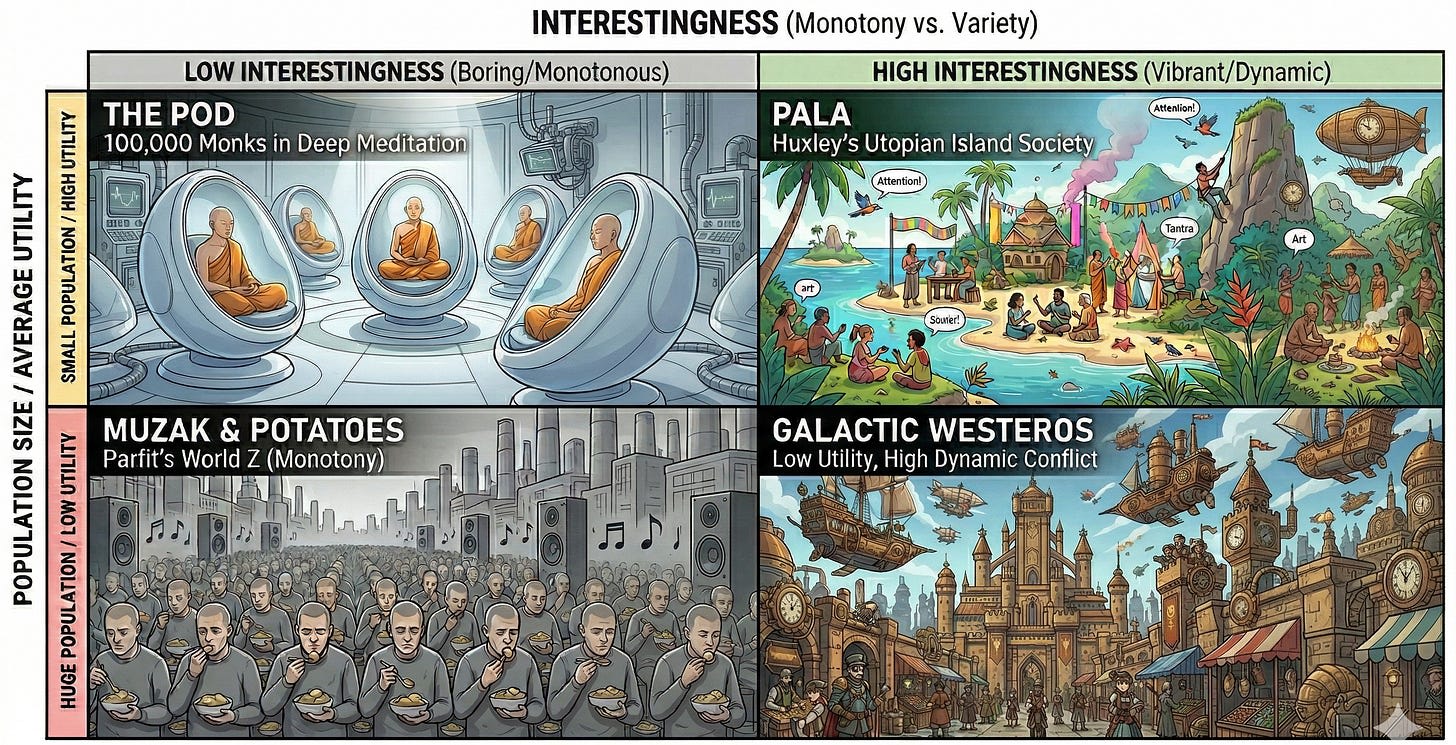
God Mode is Boring: Musings on Interestingness
(Crossposted from my Substack ) There is a preference that I think most people have, but which is extremely underdescribed. It is underdescribed because it is not very legible. But I believe that once I point it out, you will be able to easily recognize it. In a sense, I am doing something sinful here. A real description of interestingness should probably be done through song, or dance, or poetry. But I lack every artistic talent that would do the job justice. What I can do is analyze systems and write prose. Hopefully at least the LLMs will appreciate it. I am writing this with some anxiety. If it is a small sin to create an analytical post about interestingness, it is a cardinal sin to create a boring analytical post about interestingness. It is impossible to really cage within language,

You test your code. Why aren’t you testing your AI instructions?
You test your code. Why aren't you testing your AI instructions? Why instruction quality matters more than model choice, and a tool to measure it. Every team using AI coding tools writes instruction files. CLAUDE.md for Claude Code, AGENTS.md for Codex, copilot-instructions.md for GitHub Copilot, .cursorrules for Cursor. You spend time crafting these files, change a paragraph, push it, and hope for the best. Your codebase has tests. Your APIs have contracts. Your AI instructions have hope. I built agenteval to fix that. The variable nobody is testing A recent study tested three agent frameworks running the same model on 731 coding problems. Same model. Same tasks. The only difference was the instruction scaffolding. The spread was 17 points. We obsess over which model to use. Sonnet vs Opu
Knowledge Map
Connected Articles — Knowledge Graph
This article is connected to other articles through shared AI topics and tags.
More in Products


God Mode is Boring: Musings on Interestingness
(Crossposted from my Substack ) There is a preference that I think most people have, but which is extremely underdescribed. It is underdescribed because it is not very legible. But I believe that once I point it out, you will be able to easily recognize it. In a sense, I am doing something sinful here. A real description of interestingness should probably be done through song, or dance, or poetry. But I lack every artistic talent that would do the job justice. What I can do is analyze systems and write prose. Hopefully at least the LLMs will appreciate it. I am writing this with some anxiety. If it is a small sin to create an analytical post about interestingness, it is a cardinal sin to create a boring analytical post about interestingness. It is impossible to really cage within language,
Discussion
Sign in to join the discussion
No comments yet — be the first to share your thoughts!